
AI-Assisted Development & AI Features
AI has moved from a curiosity to a competitive advantage. Teams that use it effectively in their tools and products are shipping faster, fixing issues earlier, and offering smarter features to their users.
With recent RAD Studio releases, you do not need to bolt on external tools or change languages. You can:
- Use Smart CodeInsight in the IDE to accelerate day‑to‑day development.
- Use the SmartCore AI Components Pack to add AI features directly into existing VCL and FMX applications.
Staying on an older RAD Studio version increasingly means missing out on this new baseline of productivity and in‑product intelligence.
Who this page is for
- Teams on older RAD Studio versions evaluating whether AI features justify an upgrade.
- Product owners who want to add “smart” capabilities (search, recommendations, chat) without a full rewrite.
- Developers who want AI assistance but must retain control over privacy, models, and costs.
1) Smarter development in the IDE with Smart CodeInsight
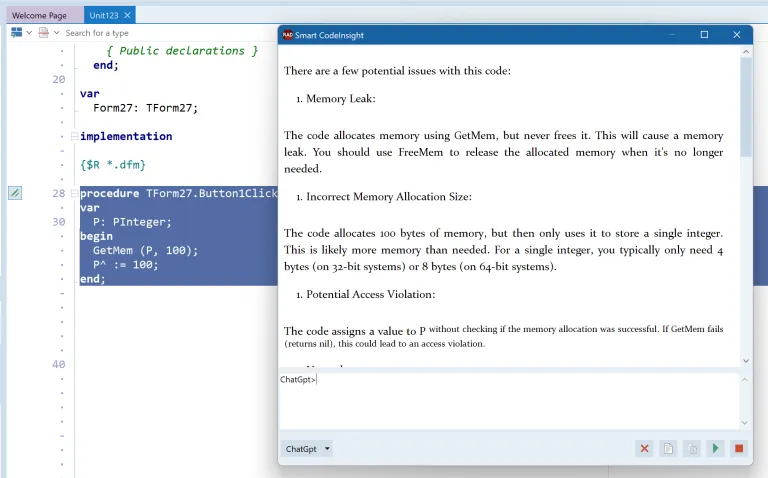
Smart CodeInsight integrates modern LLM engines directly into the IDE:
- Multiple providers, one unified experience Configure OpenAI, Gemini, Claude, or a local Ollama instance, and switch between them from the same chat and editor menus.
- AI chat window for Delphi and C++Builder questions Use a dockable chat panel to ask about APIs, patterns, or code snippets. Markdown rendering makes responses easier to read and act on.
- Context-aware editor commands
Right from the editor, send the selected code to AI to:
- find bugs or edge cases
- explain legacy code you did not write
- add comments or unit tests
- optimize or complete code
- convert between Delphi and C++Builder
- Fast access to the right units
Use the Find Unit/Header command to locate which unit declares a symbol and quickly update your
usesor#includelist, especially helpful on large legacy codebases.
First Smart CodeInsight milestone
- Enable Smart CodeInsight in a non‑critical project.
- Pilot two or three commands (for example: Explain Code, Find Bugs, Add Comment) on complex legacy units.
- Measure how much quicker new team members understand and safely refactor older code.
Control, privacy, and model choice
Modern AI tools are powerful but must be adopted on your terms. Smart CodeInsight was designed with that in mind:
- The entire feature can be turned off globally with one setting.
- Each engine (OpenAI, Gemini, Claude, Ollama) can be enabled or disabled individually.
- API keys are stored in encrypted form; you choose which endpoints and models to use.
- You can run Ollama locally (including via Docker), keeping prompts and code entirely on your own hardware.
- The ToolsAPI is open, so you can build your own AI engine plugins or custom IDE features when needed.
For teams on older versions of RAD Studio, this level of in‑IDE AI control simply does not exist. Staying behind means developers are more likely to copy‑paste code into external tools, with less governance and more friction.
Smart CodeInsight (DocWiki)
Official overview of Smart CodeInsight architecture, providers, setup, and usage in the RAD Studio IDE.
docwiki.embarcadero.com
2) Adding AI features into your existing applications
RAD Studio SmartCore AI Components Pack, available via GetIt, provides a set of non‑visual components you can drop into existing Delphi and C++Builder applications to add AI functionality without rewriting your architecture.
A familiar pattern: AI like FireDAC for data
SmartCore AI mirrors the pattern developers already know from FireDAC:
- A central
TAIConnectioncomponent, configured once with the chosen AI provider, model, and credentials. - Pluggable drivers for OpenAI, Gemini, Claude, and Ollama, with the option to create your own.
- Specific request components (for text, images, and structured data) that you can wire to UI controls and events.
If your team knows how to configure a database connection and execute queries, the learning curve to call AI services is very small.
High‑value use cases you can ship quickly
With SmartCore AI components, you can incrementally add features like:
- In‑product content creation Help users draft emails, proposals, or descriptions from within your existing application.
- Localization and on‑the‑fly translation Translate UI text, content, or reports at runtime, making your product feel native in more markets without duplicating forms.
- Smart insights and recommendations Generate explanations, summaries, or “next best action” suggestions on top of your current data, using JSON‑structured responses for safe integration.
- Embedded chatbots and assistants Add a contextual help/chat pane that understands your app’s domain and data, instead of sending users to external web documentation.
SmartCore AI Component Pack (DocWiki)
Official documentation for SmartCore AI components, including setup, component references, and usage guidance.
docwiki.embarcadero.com
SmartCore AI demos for RAD Studio
Official demo projects for text, image, and structured data workflows using SmartCore AI components.
github.com
3) Why upgrading matters for AI adoption
Older RAD Studio versions can call web APIs, but they lack:
- Integrated, configurable AI chat and editor commands in the IDE.
- A supported, component‑based AI architecture (AI connections and drivers) for applications.
- Official samples, documentation, and GetIt packages tailored to modern AI workflows.
Upgrading to the current RAD Studio line unlocks:
- Productivity gains today through Smart CodeInsight, making complex codebases easier to evolve and onboard new developers onto.
- New product features through SmartCore AI components, helping your applications stand out in crowded markets.
- An extensible foundation so you can plug in new AI providers and models as the ecosystem evolves, without redesigning your integration each time.
Teams that delay upgrading risk watching competitors release AI‑powered features first, even when those competitors have less mature core code. Moving to recent versions of RAD Studio lets you leverage your existing, battle-tested Delphi and C++Builder code while still delivering a modern, AI-augmented experience.
4) RAD AI Companion for documentation-first assistance
Alongside IDE and in-app AI features, Embarcadero provides RAD AI Companion, a web-based assistant focused on official RAD Studio, Delphi, and C++Builder documentation.
This is especially useful for:
- New team members ramping up on the RAD ecosystem.
- Quickly finding documentation-backed answers and examples.
- Getting first-pass troubleshooting ideas before deeper debugging in code.
Use with normal engineering checks Treat answers as guidance and validate them in your project context, especially for production changes.
RAD AI Companion
AI-powered documentation assistant for Delphi, C++Builder, and RAD Studio questions, examples, and guidance.
www.embarcadero.com
Webinars Series about AI
https://www.youtube.com/watch?v=3er9XvQZY78&list=PLwUPJvR9mZHguohCODAwp6rDVT91gMU07
RAD Studio AI webinar playlist covering Smart CodeInsight and SmartCore workflows.
If you would like help mapping which AI features fit your product roadmap and which RAD Studio version you should target, use the “Talk to a specialist” button on this page to discuss a tailored upgrade and adoption plan.